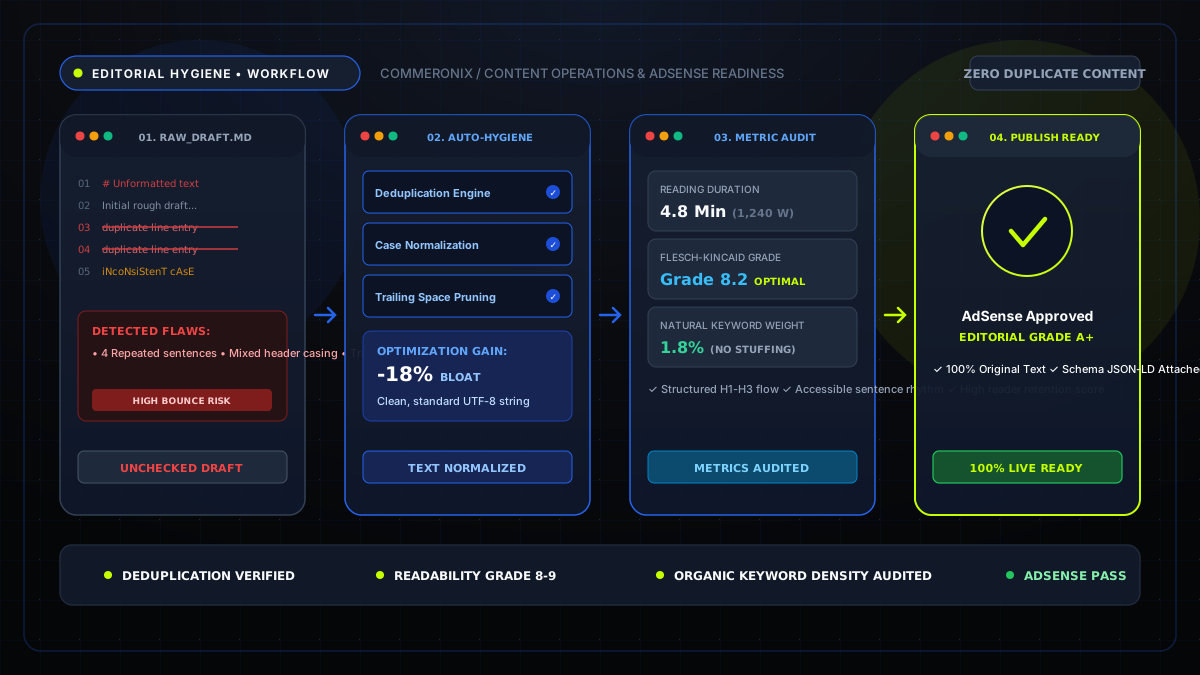
Editorial Standard: Google's Helpful Content System and Search Quality Evaluator Guidelines (E-E-A-T) prioritize text demonstrating meticulous editing, structured formatting, and clear clarity. Implementing a disciplined, client-side proofreading pipeline ensures every published asset establishes topical authority.
1. The Necessity of Editorial Hygiene in the Age of Search Algorithms
Whether producing technical software documentation, affiliate comparison guides, or commercial marketing copy, sloppy text formatting harms reader trust. Unwanted whitespace artifacts, inconsistent headline capitalizations, and grammatical run-ons create a high-friction reading experience that prompts visitors to bounce back to search results.
Search engines monitor user dwell time, scroll depth, and interaction signals. When content is cleanly structured with short paragraphs, scannable subheadings, and crisp typography, engagement metrics surge, signaling strong user satisfaction to ranking algorithms.
2. Real-Time Metric Auditing: Word Count, Sentence Rhythm, and Readability
Before moving a draft from Google Docs or Markdown into your CMS, perform a baseline metric evaluation using the Word Counter Tool:
- Total Word Count: For informational pillar articles, aim for 1,000 to 2,000 words to ensure exhaustive coverage of the topic without fluff.
- Sentence Length Variety: Alternating between short, punchy sentences (under 10 words) and structured analytical sentences (15 to 20 words) prevents reader fatigue.
- Reading Speed Calibration: Calculate whether the article fits into the reader's schedule using the Reading Time Calculator. If a piece requires 12 minutes, break it into distinct subsections with jump links.
- Keyword Density Check: Ensure your core focus keywords stay within a 1.2% to 2.0% threshold. Over-repetition signals keyword stuffing, while under-repetition fails to establish topical relevance.
Audit your article metrics in real time
Calculate characters, reading duration, and keyword frequencies instantly client-side.
3. Enforcing Typography and Casing Uniformity
A frequent error across multi-author publishing teams is inconsistent headline capitalization. An article where the H2 is formatted in Title Case while an H3 uses sentence case creates visual chaos.
To standardize your editorial style:
- Pass headlines through the Case Converter Tool to automatically apply standardized Chicago Manual of Style Title Case.
- Format developer variable names and JSON property keys into strict camelCase or snake_case with 1-click transformations.
4. Deduplication and List Sanitization for Technical Articles
When compiling resource lists, external reference links, or keyword directories, manual proofreading frequently misses duplicate entries. Repeating the same tool or link inside a resource section damages editorial credibility.
By pasting your lists into the Remove Duplicate Lines Tool, you can instantaneously strip redundant lines, trim accidental whitespace, and sort entries alphabetically in ascending or descending order.
5. Visual Diff Inspection: Preventing Accidental Editorial Deletions
During the final collaborative review between copywriters and senior editors, small edits can inadvertently remove critical disclaimers, affiliate disclosure links, or technical code arguments.
Rather than manually reading both versions side-by-side, paste the original draft and revised version into the Text Diff Checker. The visual engine renders additions in green and deletions in red, providing complete transparency into every text mutation before deployment.
6. The 6-Step Pre-Publishing Checklist
Before scheduling any post across your CMS:
- Step 1 (Wireframing): When setting up layout mocks before copy is finalized, use the Lorem Ipsum Generator to test visual typography hierarchy.
- Step 2 (Metrics Audit): Check word count and keyword density with the Word Counter.
- Step 3 (Headline Casing): Standardize all H1, H2, and H3 titles with the Case Converter.
- Step 4 (List Cleaning): Deduplicate bullet lists with the Duplicate Line Remover.
- Step 5 (Diff Verification): Verify all final changes against the initial brief using the Text Diff Checker.
- Step 6 (Permalink Generation): Convert your approved headline into an optimized URL slug via the Text to Slug Converter.