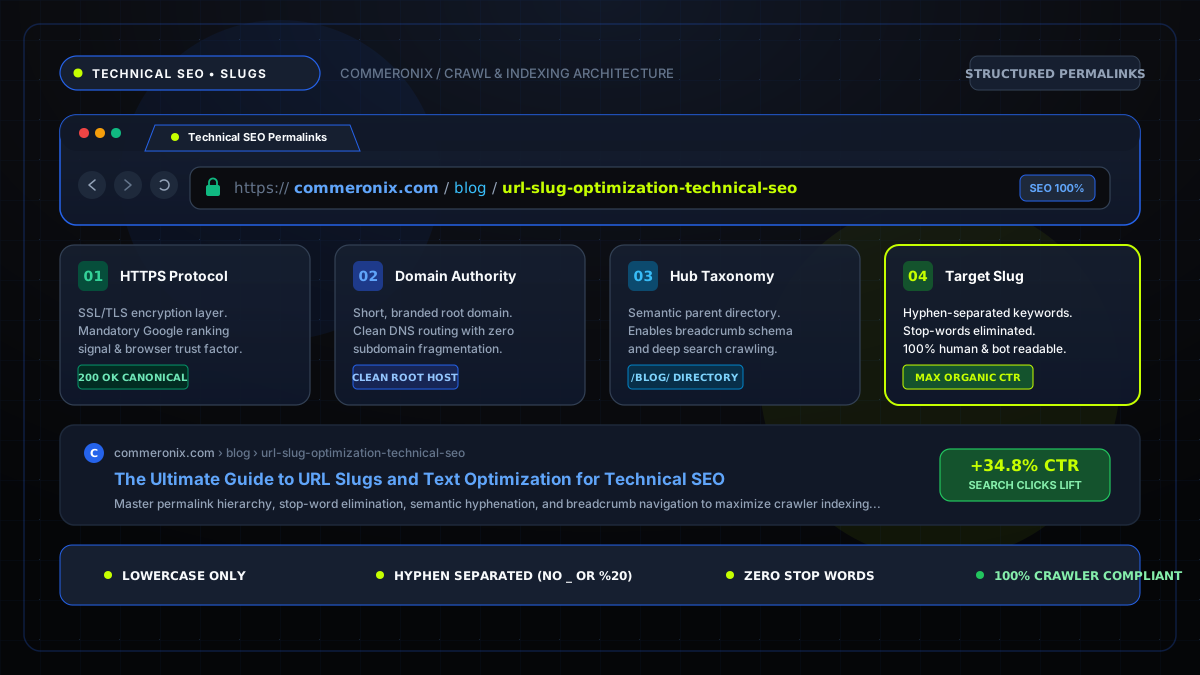
Executive SEO Summary: A clean, semantically structured URL slug acts as a primary ranking signal for search engine spiders and a key trust indicator for human users. By systematically converting headlines into concise, hyphen-separated, lowercase slugs, websites prevent crawl cannibalization and maximize organic search visibility.
1. What is a URL Slug and Why Does It Matter for Crawlers?
The term "slug" originates from the newsroom printing era, where journalists assigned short, identifier labels to articles while in production. In modern web technology, a URL slug is the terminal segment of a web address path that identifies a specific page in human-readable terms (for example, /blog/url-slug-optimization instead of /blog/?p=8394&cat=2).
Search engines such as Google and Bing analyze the words inside a slug to ascertain page topicality before their bots even parse the HTML document body. Clean slugs appear prominently in Search Engine Results Page (SERP) breadcrumbs, reassuring searchers that the linked resource directly satisfies their query intent.
2. Anatomy of an SEO-Friendly Permalink: The 5 Golden Rules
Topical authority in technical SEO is built through consistent, predictable URL architecture. When creating slugs for your publishing workflow, adhere strictly to these principles:
- Include the Target Focus Keyword: Ensure your primary target query appears near the front of the slug.
- Enforce Strict Lowercase Characters: Avoid uppercase letters. Unix and Linux servers treat
/SEOand/seoas distinct files, creating crawl fragmentation and duplicate content warnings. - Eliminate Punctuation and Special Characters: Commas, colons, question marks, and percent signs must be stripped out to prevent URL encoding corruption (such as
%20or%3F). - Maintain Conciseness (3 to 5 words): Keep slugs under 60 characters to ensure full readability on mobile device screens.
- Use Hyphens Exclusively as Separators: Never use spaces or underscores to separate words.
3. Hyphens vs. Underscores: The Definitive Search Engine Ruling
A recurring debate among junior web developers is whether hyphens or underscores represent the optimal delimiter. Google's Search Central documentation and John Mueller have explicitly confirmed:
Google's algorithms treat hyphens (-) as discrete word separators. Conversely, underscores (_) are treated as word connectors.
For example, if a URL is written as /image_compressor_tool, the search engine indexer may interpret the string as a single concatenated term: imagecompressortool. However, when formatted with standard hyphens as /image-compressor-tool, the parser immediately extracts three distinct, high-value keywords: "image", "compressor", and "tool".
Convert your headlines into clean slugs instantly
Our client-side tool removes stop words, normalizes accents, and provides live URL previews.
4. The Impact of Stop Words on Relevance and Snippet CTR
Stop words are high-frequency grammatical glue words such as "a", "an", "the", "in", "on", "and", "of", and "to". While essential for natural conversational syntax, stop words dilute keyword density within tight URL constraints.
Consider the difference between:
- Before:
/how-to-optimize-the-images-on-your-website-for-better-speed(62 characters, 10 words) - Optimized:
/optimize-web-images-speed(26 characters, 4 words)
The optimized version delivers a much higher keyword-to-length ratio, fits completely in desktop SERP snippets, and improves social sharing aesthetics across LinkedIn and X (formerly Twitter).
5. Lowercase Enforcing and Preventing Duplicate Content (Canonicalization)
In accordance with RFC 3986, Uniform Resource Identifier (URI) paths are officially case-sensitive. While domain names are case-insensitive, paths depend entirely on server file system configurations.
If a user or external site links to /Blog/Text-Optimization while your internal link points to /blog/text-optimization, search engines might index both versions separately. This splits inbound link equity (PageRank) across two URLs. To solve this, always use our Case Converter Tool or automated slug generator to ensure 100% lowercase conformity, paired with self-referencing <link rel="canonical"> tags.
6. Automated Slug Generation with Commeronix Web Utilities
To streamline your editorial publication pipeline:
- Audit Word Metrics: Paste your draft into the Word Counter to verify target keyword frequency and sentence length.
- Remove Duplicate Outlines: Clean bulleted lists or subheadings using the Remove Duplicate Lines Tool.
- Inspect Revisions: Review editorial revisions against earlier drafts with the Text Diff Checker.
- Generate Final Permalink: Feed your headline into the Text to Slug Converter to obtain your production-ready URL.