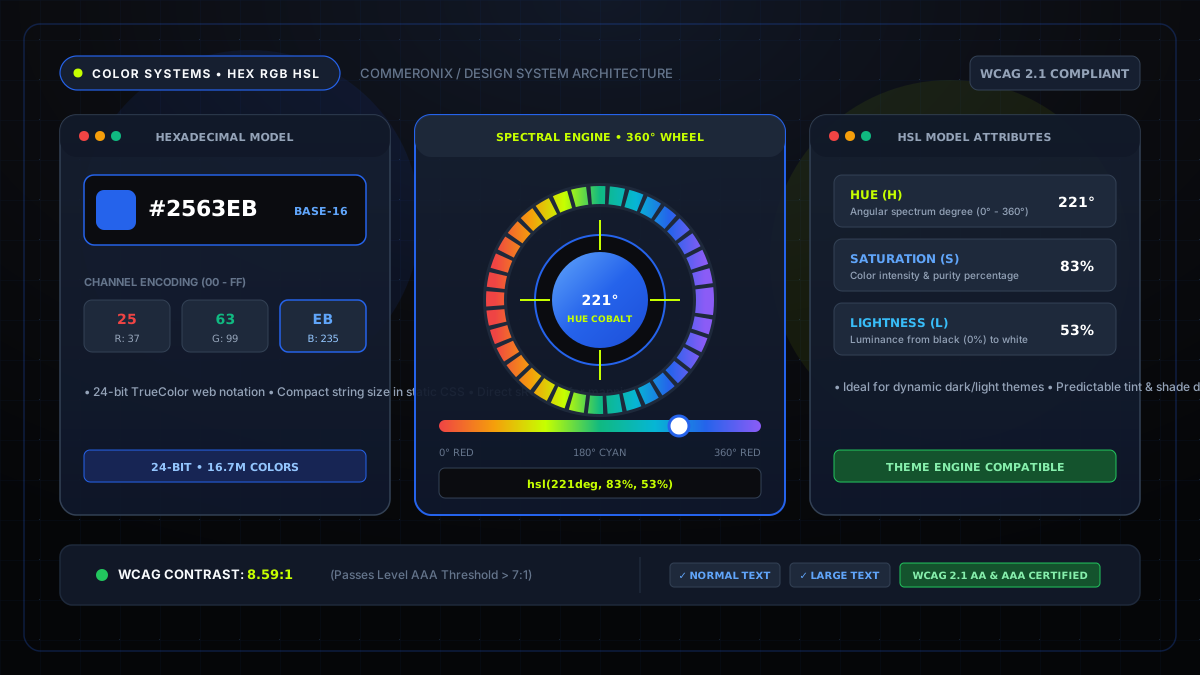
Architecture Summary: Digital displays emit light via additive RGB matrices, while print hardware deposits subtractive CMYK ink. Translating between HEX, RGB, and HSL allows design engineers to build accessible, mathematically harmonious theme systems with zero runtime performance penalties.
1. The Physics of Digital Screen Color: Additive vs. Subtractive
Every digital display—from high-resolution OLED smartphone displays to desktop monitors—creates images by combining red, green, and blue sub-pixels. This is known as the additive color model. When all three wavelengths are emitted at maximum intensity, the human retina perceives pure white light (#FFFFFF). In the absence of light emission, we perceive black (#000000).
Conversely, physical printing uses the subtractive CMYK model (Cyan, Magenta, Yellow, Key/Black). Inks absorb specific light wavelengths, reflecting only the unabsorbed remainder back to our eyes. Understanding this distinction is critical when transitioning digital branding into physical merchandise packaging.
2. Deconstructing HEX: Base-16 Channel Mathematics
Hexadecimal notation is the most ubiquitous color format on the web. A standard 6-digit hex code begins with a hash symbol followed by three 2-character hexadecimal byte representations: #RRGGBB.
Because base-10 uses numbers 0 through 9, base-16 introduces letters A through F to represent values 10 through 15:
00= 0 (channel completely off)7F= 127 (channel at 50% power)FF= 255 (channel at 100% full saturation)
For example, in Commeronix's Electric Cobalt Blue brand color (#2563EB):
- Red:
0x25= (2 × 16) + 5 = 37 - Green:
0x63= (6 × 16) + 3 = 99 - Blue:
0xEB= (14 × 16) + 11 = 235
3. The RGB Model: The Native Language of Pixels
The rgb(r, g, b) CSS functional notation represents the same underlying physical values in standard decimal numbers from 0 to 255. In modern CSS Color Module Level 4, transparency is integrated via a fourth alpha argument: rgb(37 99 235 / 0.85).
While intuitive for hardware, RGB is difficult for human designers to manipulate mentally. For instance, if an interface designer wants to lighten a button by 10% on hover, determining which decimal values to add across all three RGB channels simultaneously requires complex arithmetic.
Test colors and check WCAG contrast live
Use our interactive color picker to convert HEX, RGB, HSL, and CMYK with harmonious palette generation.
4. HSL: The Modern Design System Superpower
HSL (Hue, Saturation, Lightness) models color in a cylindrical coordinate geometry that directly matches human perception:
- Hue (0° to 360°): The radial position on the color wheel (0° = Red, 60° = Yellow, 120° = Green, 180° = Cyan, 240° = Blue, 300° = Magenta).
- Saturation (0% to 100%): The intensity or vividness of the hue. 0% is pure monochrome gray, while 100% is vibrant pigment.
- Lightness (0% to 100%): The luminosity level. 0% is pitch black, 50% is the true hue, and 100% is pure white.
In modern CSS custom property architectures, defining a primary brand token in HSL enables effortless state variations:
:root {
  --brand-h: 221;
  --brand-s: 83%;
  --brand-l: 53%;
  --brand-primary: hsl(var(--brand-h), var(--brand-s), var(--brand-l));
  --brand-hover: hsl(var(--brand-h), var(--brand-s), calc(var(--brand-l) - 8%));
  --brand-subtle: hsl(var(--brand-h), var(--brand-s), 95%);
}
5. Web Accessibility: WCAG 2.1 AA/AAA Contrast Auditing
Aesthetic design must never compromise universal accessibility. The Web Content Accessibility Guidelines (WCAG) 2.1 define mathematical formulas for relative luminance to ensure text remains legible for users with low vision or color blindness:
- Level AA (Minimum Requirement): 4.5:1 contrast ratio for body text; 3.0:1 for large headings (18pt+).
- Level AAA (Enhanced Requirement): 7.0:1 contrast ratio for body text; 4.5:1 for headings.
Our client-side Color Picker & Converter automatically calculates relative luminance in real time, notifying you immediately whether your chosen foreground text passes or fails WCAG AA standards.
6. Interactive Color Conversion with Commeronix Utilities
Whenever you are building design systems, styling web applications, or optimizing SVGs, you can use our client-side utilities:
- Convert raw color codes across HEX, RGB, HSL, and CMYK with the Color Picker Tool.
- Generate complementary and triadic palettes for UI cards and badges.
- Inspect and convert image assets into inlined Base64 styles with the Image to Base64 Encoder.